ATS Friendly Resume for Freshers: Format, Keywords and a Step-by-Step Checklist
Pankaj Gupta · 24 Oct 2026 · Career & Interview Prep
Key Takeaways
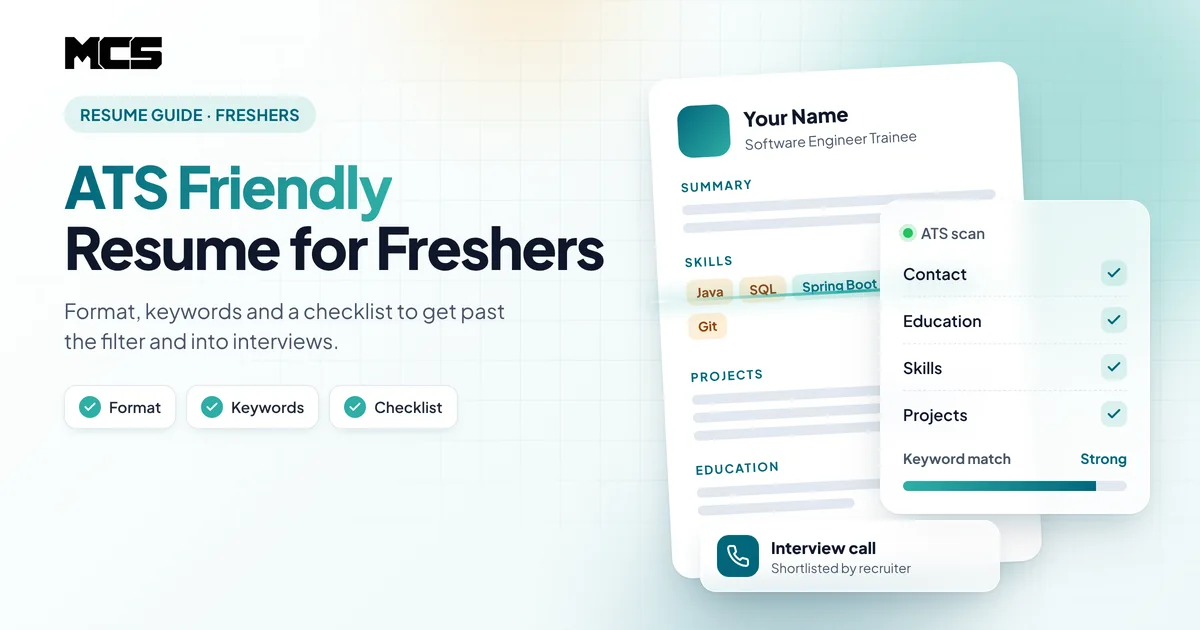
- An ATS friendly resume for freshers is a simple, single-column resume with standard headings, plain text and the exact skills the job description asks for.
- Most rejections at the screening stage happen because the software cannot read the resume properly or does not find the right keywords, not because the candidate is weak.
- Keep contact details in the main body, avoid tables, text boxes, icons and skill bars, and save the file as a text-based PDF or DOCX.
- Tailor your summary, skills and project bullets to every job you apply for. One generic resume sent everywhere rarely gets calls.
- Use the step-by-step checklist below before every application, and track which version of your resume brings interview calls.
If you are a fresher sending out dozens of applications and hearing nothing back, the problem may not be your degree or your skills. It may be your resume format. Many companies, job portals and recruiting teams use an Applicant Tracking System (ATS) to collect and filter applications, and an ATS friendly resume for freshers is the first thing that decides whether a human recruiter ever sees your profile. This guide explains, in plain language, how an ATS reads a resume, which format works, what to write in every section, how to pick keywords from a job description, and a checklist you can use before you hit "Apply".
This guide is written for Indian freshers and early-career candidates, especially those applying for IT, software, analyst, support and MNC roles. If you have not read it yet, also see our guide on how to get interview calls for freshers, which covers the full job search plan.
Table of Contents
- What is an ATS and why freshers should care
- How an ATS reads your resume
- ATS friendly resume format for freshers
- What to write in each section
- How to find and use the right keywords
- Common mistakes that get fresher resumes filtered out
- Step-by-step checklist before you apply
- How My Career Solution helps
- FAQs
What Is an ATS and Why Freshers Should Care
An Applicant Tracking System is software that companies use to receive, store, search and shortlist job applications. When you apply on a company careers page or through many job portals, your resume usually goes into an ATS first. The recruiter then searches or filters the applications by job title, skills, location, education and other details.
For freshers this matters a lot, because entry-level roles attract a very large number of applicants. Recruiters cannot open every file one by one, so they lean on the system's search and ranking. If your resume is hard for the software to read, or if it does not contain the words the recruiter is searching for, your application can sit unseen even when you are a good fit.
The good news is that beating the ATS is not about tricks. It is about writing a clear, well-structured resume that both software and humans can read in seconds.
How an ATS Reads Your Resume
Different ATS products work a little differently, but most follow the same basic flow. Understanding it helps you see why some resume designs fail.
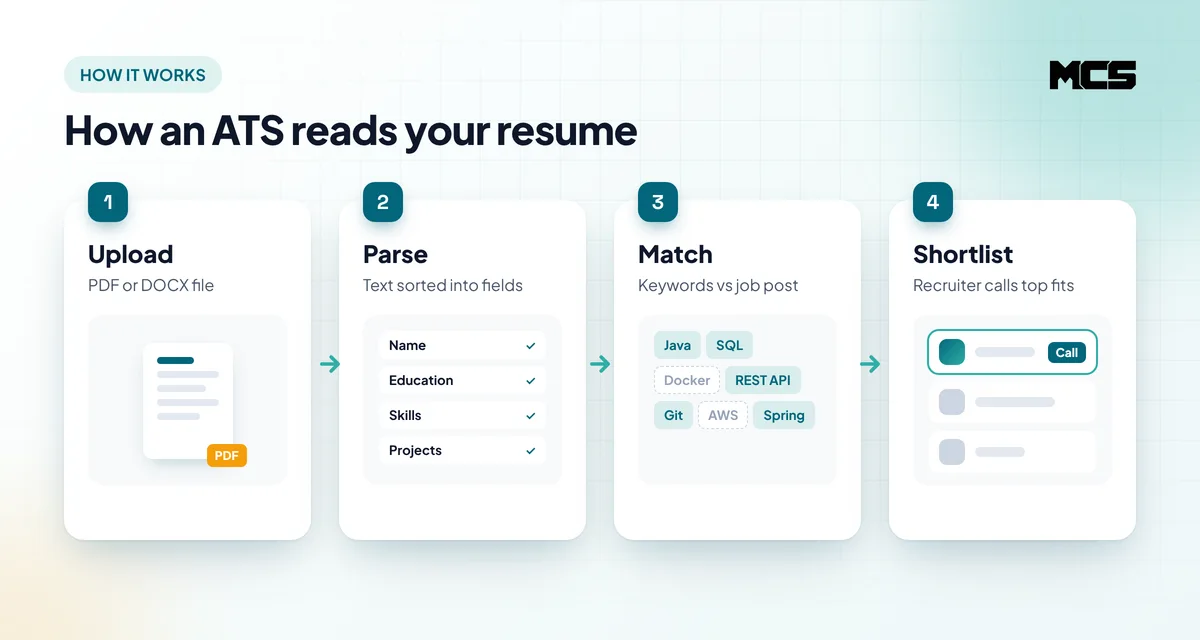
- Upload: you submit a PDF or DOCX file through a portal or careers page.
- Parsing: the system extracts the text and tries to place it into fields such as name, email, phone, education, skills and experience. It relies on standard headings like "Education" and "Skills" to know where each section starts.
- Keyword matching: the recruiter searches or filters for skills, tools and job titles. Many systems match words fairly literally, so "React.js" in the job post and "React" on your resume may or may not be treated the same.
- Shortlisting: the recruiter reviews the top matches and decides whom to call.
Parsing is where most design-heavy resumes break. Text inside tables, text boxes, multiple columns, headers, footers or images can come out jumbled, land in the wrong field or disappear entirely. A resume that looks beautiful in Canva can read like a scrambled paragraph inside an ATS.
ATS Friendly Resume Format for Freshers
The safest format for a fresher is a one-page, single-column, reverse-chronological resume. Here is what that means in practice.
Layout
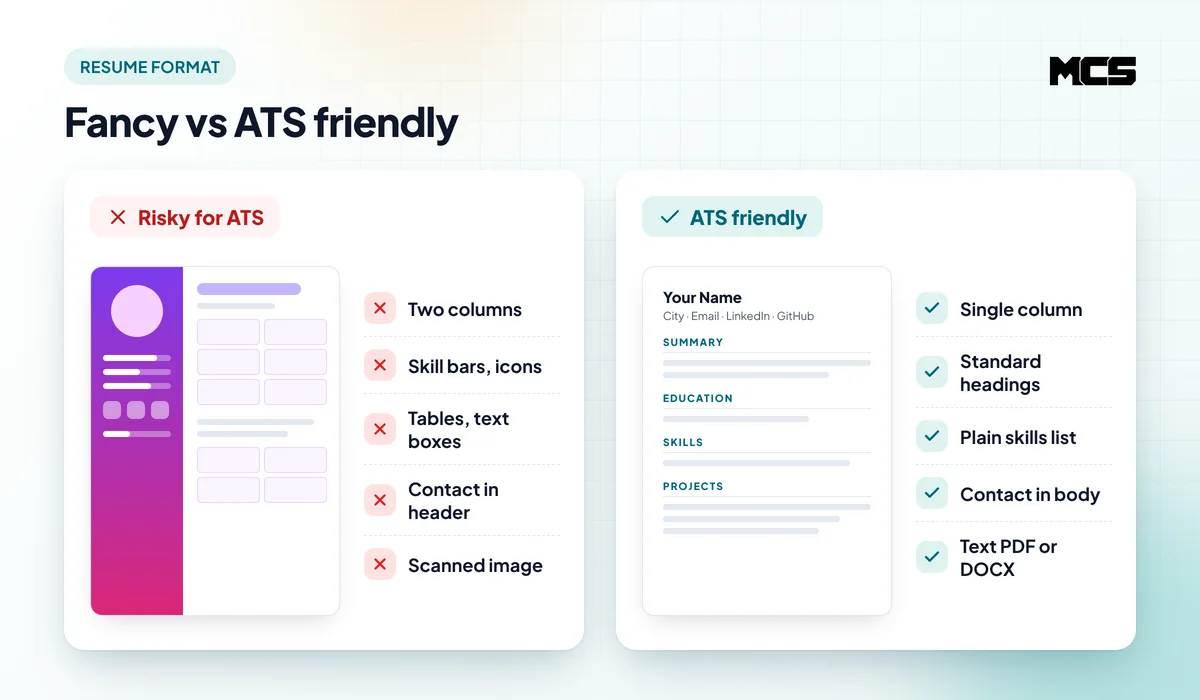
- One column: the ATS reads from left to right, top to bottom. Two-column layouts can mix lines from both columns.
- One page: for freshers, one page is usually enough. Fill it with projects and skills, not decoration.
- Clear margins and spacing: keep enough white space so a recruiter can scan it quickly.
Fonts and styling
- Use a common font such as Calibri, Arial, Helvetica or similar, at 10.5 to 12 points for body text.
- Use bold for headings and job or project titles. Avoid colored text for important information.
- Use simple round or square bullets. Avoid icons, emojis, star ratings and skill bars, since the ATS cannot read a "4 out of 5" graphic.
Headings
Use plain, standard section names: Summary, Education, Skills, Projects, Internships or Experience, Certifications and Achievements. Creative headings like "My Journey" or "What I Bring" can confuse the parser.
File type and file name
- Save as a text-based PDF (exported from Word or Google Docs) or DOCX, unless the employer asks for a specific format.
- Never upload a scanned image or a photo of your resume. The ATS cannot read it.
- Name the file clearly, for example Rahul-Sharma-Java-Developer-Resume.pdf.
| Element | ATS friendly | Risky for ATS |
|---|---|---|
| Layout | Single column | Two or three columns, sidebars |
| Contact details | In the main body at the top | Inside the page header or footer |
| Skills | Plain text list | Skill bars, ratings, icons |
| Structure | Headings and bullet points | Tables and text boxes |
| File | Text-based PDF or DOCX | Scanned image, JPG, PNG |
| Photo | Not needed for most private jobs | Large photo or graphics |
What to Write in Each Section
Here is a proven structure for an ATS friendly fresher resume, in the order recruiters expect to see it.
1. Contact details
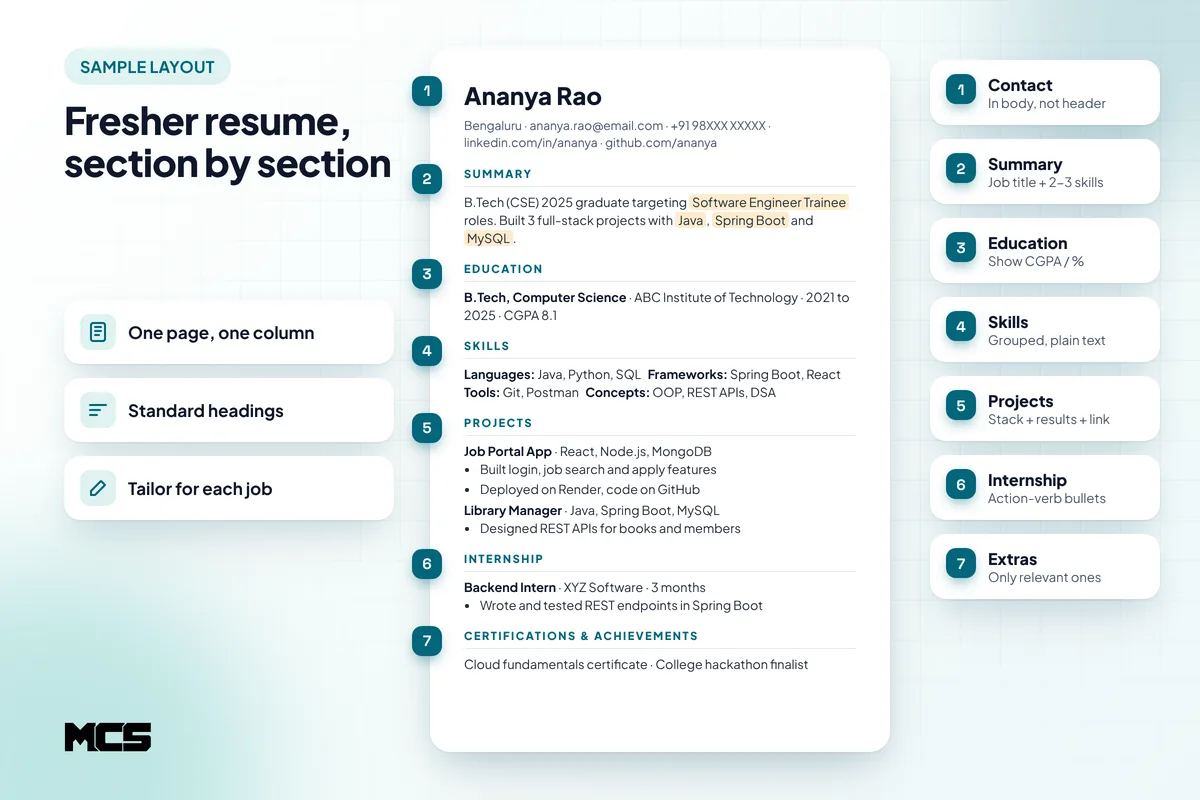
Full name, phone number, a professional email address, city, and links to your LinkedIn and GitHub or portfolio. Keep these as normal text at the top of the page, not inside the document header. You do not need your full home address, date of birth or father's name for most private sector jobs.
2. Professional summary (2 to 3 lines)
Skip the old-style "career objective" about wanting a challenging role. Write a short summary that names your degree, your target role, two or three key skills and one proof point. Example: "B.Tech (CSE) 2025 graduate targeting Java Developer roles. Built three full-stack projects with Java, Spring Boot and MySQL, and completed a 3-month backend internship. Comfortable with REST APIs, Git and SQL."
3. Education
List your degree, college, university, year of passing and CGPA or percentage. Add Class 12 and Class 10 briefly if your degree score is not strong or if the employer asks for it. Many Indian companies have academic cut-offs, so do not hide your scores.
4. Skills
Group skills so both the ATS and the recruiter can scan them: Languages: Java, Python, SQL. Frameworks: Spring Boot, React. Tools: Git, Postman, VS Code. Concepts: OOP, REST APIs, Data Structures. Only list what you can talk about in an interview.
5. Projects
For freshers, projects are your work experience. Add two or three relevant projects with the project name, tech stack and two to three bullets each. Start every bullet with an action verb and show what you built and the result. Example: "Built a job portal web app using React and Node.js with login, search and apply features; deployed on Render." Add the GitHub link.
6. Internships or experience
Write the company, role, duration and what you did, using the same bullet style. Even a short internship, a freelance project or a college technical role counts if it shows relevant skills.
7. Certifications and achievements
Include certifications relevant to the role (cloud, data, testing, programming), hackathon results, coding contest ranks and leadership roles in clubs or events. Keep each line short.
How to Find and Use the Right Keywords
Keywords are the skills, tools, job titles and qualifications that the recruiter searches for. The best source of keywords is the job description itself. Here is a simple method.
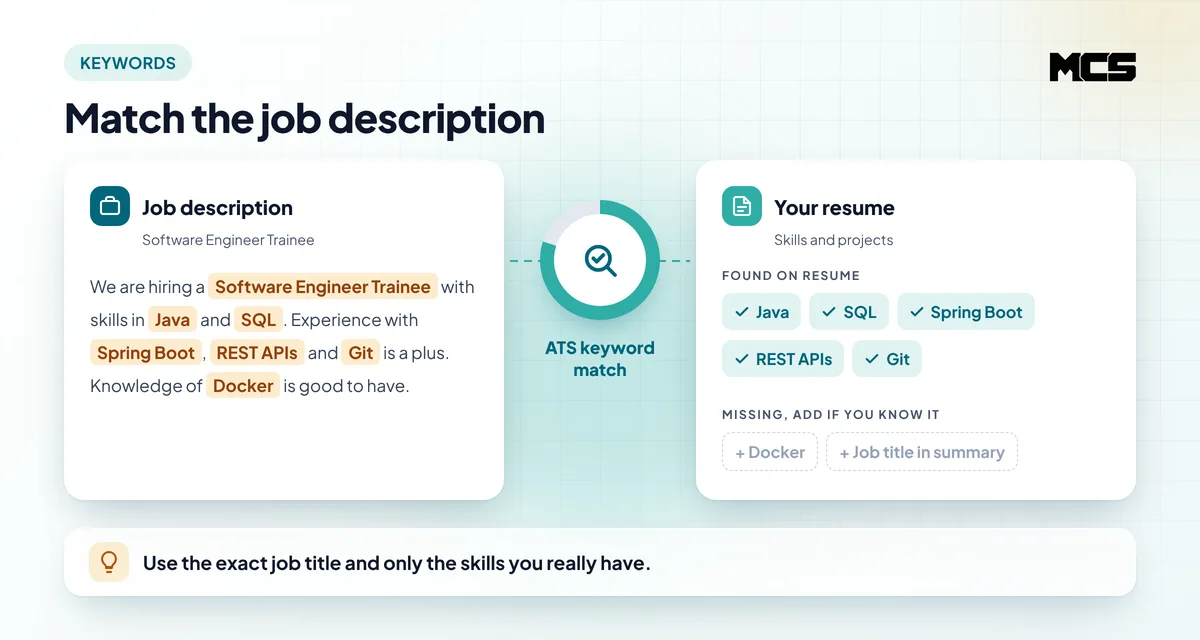
- Copy the job description into a notes file and highlight every skill, tool, degree and job title it mentions.
- Mark the must-haves: words that appear more than once or sit under "Requirements" are usually the ones the recruiter filters on.
- Match honestly: for every highlighted skill you genuinely have, make sure the same word appears on your resume, ideally in both the Skills section and a project bullet that shows you used it.
- Use the exact wording: if the post says "Software Engineer Trainee", use that phrase in your summary instead of "coding enthusiast". Write both the full form and the short form once, for example "Structured Query Language (SQL)" or "Continuous Integration (CI)".
- Do not stuff: repeating words, adding skills you do not have, or hiding keywords in white text can get you rejected by the recruiter even if the software ranks you higher.
Not sure which roles match your skills in the first place? Read how to find the right job based on your skills and experience, then browse current openings on the MCS jobs page and collect keywords from real postings.
Common Mistakes That Get Fresher Resumes Filtered Out
- Using a fancy two-column template with icons, photos and progress bars.
- Putting contact details in the header or footer, where some systems do not look.
- Sending the same resume to every job without changing the summary, skills order or project focus.
- Listing skills without proof: a long list of 25 technologies with no project that uses them looks weak to recruiters.
- Uploading an image or scanned PDF that the ATS cannot read as text.
- Spelling mistakes in key skills, such as "Javascrpit" or "Pyhton", which will not match any search.
- Unprofessional email IDs and missing LinkedIn or GitHub links.
- Two or three page resumes filled with school activities and hobbies instead of projects.
Step-by-Step Checklist Before You Apply
Run through this checklist every time you send your resume.
- Is it a single-column, one-page resume with standard headings?
- Are your name, phone, email, city, LinkedIn and GitHub in the main body at the top?
- Does your summary mention the exact job title from the posting?
- Do the top five skills in the job description appear in your Skills section, and at least two of them in a project bullet?
- Does every project have a tech stack, two or three action-verb bullets and a link?
- Are there no tables, text boxes, icons, images or skill bars?
- Have you checked spelling, especially of tools and technologies?
- Is the file a text-based PDF or DOCX with a clear file name? Test it: open the PDF, select all the text and paste it into Notepad. If the text comes out in the right order, an ATS can most likely read it too.
- Have you saved this tailored version separately so you can track which version gets calls?
Once your resume is ready, apply to the right companies. Our lists of top IT companies in India for freshers and best IT companies in Hyderabad for freshers are a good place to start, and you can explore more employers on the MCS companies page.
How My Career Solution Helps
A strong resume is step one. Getting it in front of the right recruiters is step two, and that is where My Career Solution helps freshers and experienced professionals.
- Free applications on signup: when you create your free MCS profile, we apply for you to 5 companies at no cost, so you can start getting your profile seen right away.
- Resume builder in your dashboard: create and update your resume inside your MCS account.
- ATS resume refinement with MCS Pro: MCS Pro plans include resume refinement with keyword alignment, stronger bullet points and clean, ATS friendly formatting.
- Guaranteed interview calls: MCS packages come with a guaranteed number of interview calls based on the package you choose, and our team sends your profile directly to hiring teams.
See what other candidates say on our reviews page, compare plans on the packages page, or read more career guides on the MCS blog.
FAQs
What is an ATS friendly resume for freshers?
It is a simple, single-column resume with standard headings, plain text and the keywords from the job description, so that an Applicant Tracking System can read it correctly and a recruiter can find it when searching for candidates.
Which resume format is best for freshers in India?
A one-page, reverse-chronological format works best: contact details, a short summary, education, skills, projects, internships, certifications and achievements, saved as a text-based PDF or DOCX.
Are Canva resumes ATS friendly?
Many Canva templates use columns, icons, text boxes and graphics that ATS software can misread. If you use Canva, pick a plain single-column template and test it by copying the PDF text into Notepad to check that it stays in order.
Should a fresher add a photo to the resume?
For most private sector jobs in India, a photo is not required and adds no value for the ATS. Add one only if the employer specifically asks for it.
How many keywords should I add to my resume?
There is no fixed number. Cover the main skills, tools and job title from the job description that you genuinely have, and show them in your Skills section and project bullets. Avoid repeating words just to increase the count.
Ready to turn your resume into interview calls? Create your free MCS profile to get applied to 5 companies free, or check our packages for guaranteed interview calls.
Frequently asked questions
What is an ATS friendly resume for freshers?
It is a simple, single-column resume with standard headings, plain text and the keywords from the job description, so that an Applicant Tracking System can read it correctly and a recruiter can find it when searching for candidates.
Which resume format is best for freshers in India?
A one-page, reverse-chronological format works best: contact details, a short summary, education, skills, projects, internships, certifications and achievements, saved as a text-based PDF or DOCX.
Are Canva resumes ATS friendly?
Many Canva templates use columns, icons, text boxes and graphics that ATS software can misread. If you use Canva, pick a plain single-column template and test it by copying the PDF text into Notepad to check that it stays in order.
Should a fresher add a photo to the resume?
For most private sector jobs in India, a photo is not required and adds no value for the ATS. Add one only if the employer specifically asks for it.
How many keywords should I add to my resume?
There is no fixed number. Cover the main skills, tools and job title from the job description that you genuinely have, and show them in your Skills section and project bullets. Avoid repeating words just to increase the count.